Below is a succinct breakdown of the parameters used in the create-tx API endpoint. Detailed descriptions and usage examples are
provided in dedicated subpages.
Notable API Categories
There are several categories of parameters that are particularly important to understand when working with the create-tx
endpoint:
Authentication
| Parameter | Example Value | Description |
|---|
accesstoken | xx789x | Access token generated by deBridge. |
Directional Parameters
These parameters define the origin and destination of the transaction, including the assets being sold on the source chain and the
assets being purchased on the destination chain.
| Parameter | Example Value | Description |
|---|
srcChainId | 56 | Internal chainId of the supported source chain. |
srcChainTokenIn | 0x8AC76a51cc950d9822D68b83fE1Ad97B32Cd580d | Input asset address (what the user sells). |
dstChainId | 43114 | Internal chainId of the supported destination chain. |
dstChainTokenOut | 0x9702230A8Ea53601f5cD2dc00fDBc13d4dF4A8c7 | Output asset address (what the user buys). |
Offer Parameters
These parameters specify the amounts of tokens to be sold and received. The API can also be configured to automatically determine
the output amount to ensure a reasonably profitable market order.
| Parameter | Example Value | Description |
|---|
srcChainTokenInAmount | 100000000000000000000 or auto | Amount of input token (with decimals). Can be auto if dstChainTokenOutAmount is specified. |
dstChainTokenOutAmount | auto or 100000000000000000000 | Amount of output token. Recommended to use auto for optimal solver matching. |
prependOperatingExpense | true | Adds estimated operating expense to input token. Recommended for better UX. |
Authorities and Recipient Address
Optional parameters defining entities authorized to patch/cancel the order, and the recipient of funds on fulfillment. Typically
user addresses are used.
These parameters are optional. However, omitting them means the API won’t return a signable transaction payload until wallet
connection.
Ensure dstChainOrderAuthorityAddress is user-accessible — otherwise funds may become inaccessible.
| Parameter | Example Value | Description |
|---|
srcChainOrderAuthorityAddress | 0xd8dA...ABCD or 862oLANN... | Set the source chain authority address to the user’s address. Used as fallback for srcAllowedCancelBeneficiary if the latter is not set explicitly. |
dstChainOrderAuthorityAddress | 0xd8dA...ABCD or 862oLANN... | Can cancel order on destination chain. Must be controlled by the user. |
dstChainTokenOutRecipient | 0xd8dA...ABCD or 862oLANN... | Recipient of funds on destination chain after fulfillment. Typically the user’s address. |
Affiliate Fee Parameters
These settings define the affiliate fee recipient and amount.
| Parameter | Example Value | Description |
|---|
affiliateFeePercent | 0.1 | Percentage of input amount to assign as affiliate fee. |
affiliateFeeRecipient | 0xd8dA...ABCD or 862oLANN... | Address (EVM) or pubkey (Solana) that will receive affiliate fees once order reaches ClaimUnlocked state. |
Referral Code
Optional tracking and reward parameter.
| Parameter | Example Value | Description |
|---|
referralCode | 31805 | Integrator’s referral code. Can be generated in-app. |
Cancellation Beneficiary
Optional parameters, but required for auto-cancellations to work.
| Parameter | Example Value | Description |
|---|
srcAllowedCancelBeneficiary | 0xd8dA...ABCD or 862oLANN... | Address receiving the source chain input funds in an event of cancellation. More information available in the auto-cancellations article. |
Transaction Estimation
For EVM chains, the API can be configured to validate the resulting transaction and provide an estimate of its gas consumption.
This is particularly useful for ensuring that all of the conditions for executing the transaction are met before submission, such
as sufficient token balances and approvals.
| Parameter | Example Value | Description |
|---|
enableEstimate | true or false | Forces the API to validate the resulting transaction and estimate its gas consumption. When enabled, the estimate is returned at tx.gasLimit in the response object. |
To estimate a transaction, senderAddress must be set to the address that will execute it. This address must hold:
- Enough of the input token to cover
srcChainTokenInAmount
- Enough native currency to cover the protocol fixed fee
If srcChainTokenIn is an ERC-20 token, an approval must be provided for the specified srcChainTokenInAmount to the spender
specified in the
tx.to from the response
before the endpoint is called.Failing to provide a valid approval will result in an error response. Solana-Specific Parameters
| Parameter | Example Value | Description |
|---|
skipSolanaRecipientValidation | true or false | When set to true, skips the validation of the Solana dstChainTokenOutRecipient address. The validation is in place to prevent accidental loss of funds. Might be necessary when the recipient address is a program-derived address (PDA) or a multi-sig. |
Example Request
The following example shows a complete create-tx API request:
https://dln.debridge.finance/v1.0/dln/order/create-tx?srcChainId=56 &srcChainTokenIn=0x8AC76a51cc950d9822D68b83fE1Ad97B32Cd580d &srcChainTokenInAmount=100000000000000000000&dstChainId=43114 &dstChainTokenOut=0x9702230A8Ea53601f5cD2dc00fDBc13d4dF4A8c7 &dstChainTokenOutAmount=auto &dstChainTokenOutRecipient=0xd8dA6BF26964aF9D7eEd9e03E53415D37aA96045 &srcChainOrderAuthorityAddress=0xd8dA6BF26964aF9D7eEd9e03E53415D37aA96045 &dstChainOrderAuthorityAddress=0xd8dA6BF26964aF9D7eEd9e03E53415D37aA96045 &affiliateFeePercent=0.1 &affiliateFeeRecipient=0xd8dA6BF26964aF9D7eEd9e03E53415D37aA96045
This request demonstrates how all core parameters are combined to generate a valid and executable cross-chain order.
Deep Dive
Reference to common and interesting use-cases. Deep dive into certain parameters.
Estimation Only
The create-tx endpoint is designed for both estimation and transaction construction. It can be safely called without specifying
authority or recipient addresses
when a wallet address is not yet available—for example, during early stages of interaction in a dApp. In such cases, the endpoint
can still be used to suggest input or output token amounts.
Once the wallet address becomes available, the same create-tx request can be repeated with the necessary parameters to retrieve
a full transaction call.
To maintain solver profitability and ensure the order remains valid upon submission, it is recommended to allow the API to compute
a reasonable output amount. This is achieved by setting the dstChainTokenOutAmount parameter to auto in both the estimation
and transaction calls.
Additionally, orders should be submitted within 30 seconds of retrieving the transaction from the API. This expiration window
helps ensure the order remains profitable for solvers at the time of on-chain placement.
prependOperatingExpenses
The prependOperatingExpenses setting is a boolean. It is recommended to enable this option:
prependOperatingExpenses = true
Enabled (prependOperatingExpenses=true)
When enabled, operating expenses are calculated separately from the spread and added on top of the input token amount, making all
fees fully transparent. This approach helps clarify exactly what is being paid in fees.
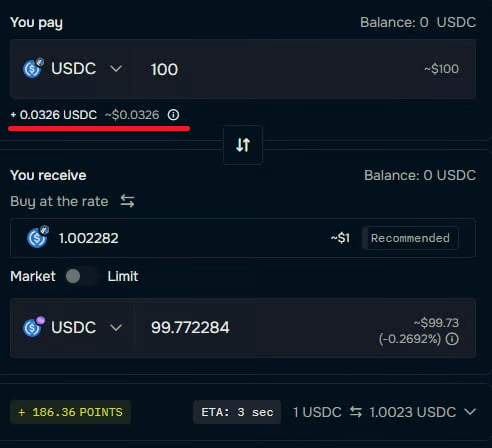
For example, swapping 100 USDC on Arbitrum for 100 USDC on Polygon in our application displays a small fee (just over $0.03),
shown above the red line in the figure below. This represents the solver’s operating expenses.
- ERC20 Approval: The total amount (including operating expenses) must be approved using the
approve function. This value is
provided in response.estimation.srcChainTokenIn.amount.
- Buffer Recommendations: Estimates may need to be refreshed if there is a delay between generating the response and
submitting
response.tx. Updated operating expenses might require a new approval.
- Fulfillment Likelihood: When
response.tx is signed and submitted within 30 seconds, the probability of successful
execution is over 99.9%.
Disabled (prependOperatingExpenses=false)
When disabled, response.estimation.srcChainTokenIn.amount equals the srcChainTokenInAmount specified in the original
create-tx request. In this case, the
operating expenses are subtracted directly from the
spread between the input value and response.estimation.dstChainTokenOut.
In this case, an additional error should be covered. It occurs when the input amount is too small to pay for the order costs.
{
  "errorCode": 12,
  "errorId": "ERROR_LOW_GIVE_AMOUNT",
  "errorMessage": "Given amount of input asset is too small to cover operational costs of Takers, cannot estimate reasonable outcome of an order",
  "reqId": "79a2c431-e52c-48c0-a12e-2a9960644a59"
}
prependOperatingExpenses typically provides a clearer breakdown of
the fee structure for end users.
When creating an order with Solana as the destination chain and when dstChainTokenOut is
SOL, the required minimum
output amount for SOL is 0.001 (1000000 lamports).
This is due to the minimum balance requirement for SOL accounts on the Solana network, which ensures that accounts remain
rent-exempt and can cover transaction fees.
Due to shifting market conditions, the minimum input amount for tokens on the source chain may vary.
It is recommended to determine the minimum input amount for a given token by creating a
reverse-market order
with the dstChainTokenOutAmount set to 1000000 and the srcChainTokenInAmount set to auto.
This approach allows following the market conditions, without hardcoding specific minimum input amounts for each token. 
