

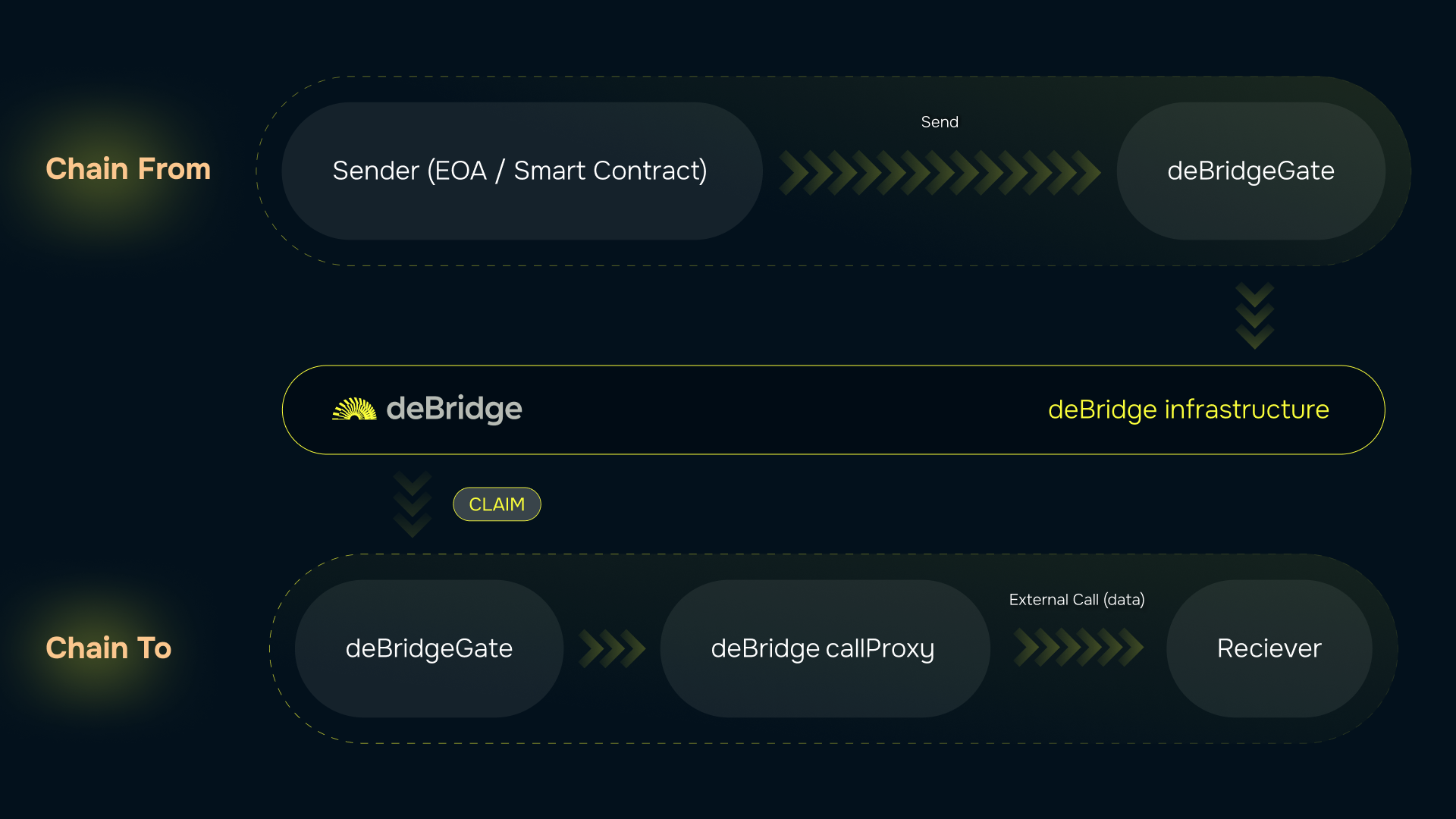
Build your first deApp
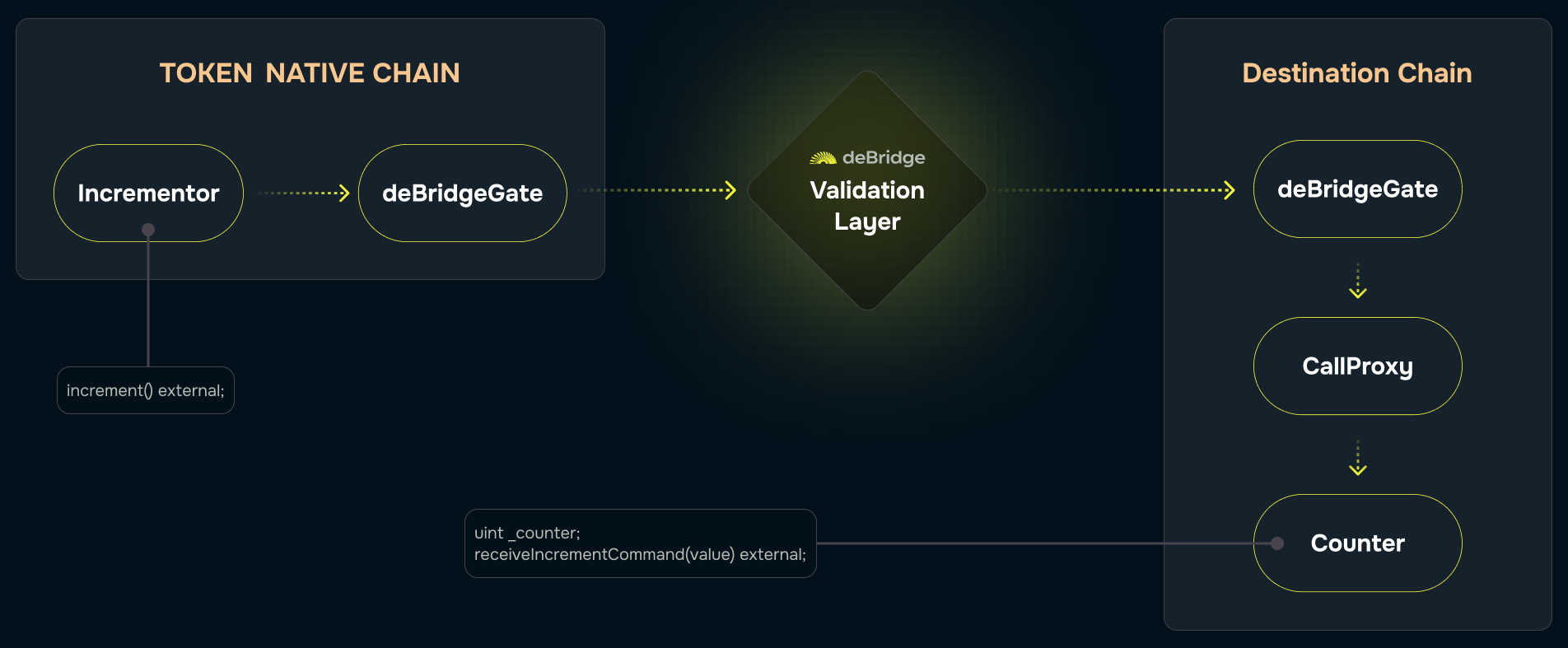
Let’s consider the following idea of the conceptual dApp consisting of two smart contacts: aCounter smart contract residing in one chain, where the
integer property (counter) is stored and can be incremented by a call initiated by and only by the Incrementor contract from another chain. In other
words, when we perform some action against the Incrementor contract, it initiates a cross-chain transaction (a submission, in terms of the deBridge
protocol) which is being started on one chain, relayed to, and then executed on another chain; during this cross-chain transaction, a Counter contract
is called. The following image presents a high-level overview of a cross-chain transaction we are going to achieve:
Making the Counter contract
Let’s start with making the counter contract, responsible for keeping the integer property and accepting calls to increment it. Obviously, there should be a property and a method:deBridgeGate smart
contract only, and second, this call should occur only during the cross-chain transaction originating from the Incrementor smart contract at the
specific address on another chain. How can this be achieved?
The cross-chain transaction is a message from the origin chain with a payload that includes (among other info) the packed address of the initiator
(nativeSender) - i.e. an entity that actually initiated the transaction by calling the deBridgeGate contract on the origin chain. When the cross-chain
transaction is being relayed, the deBridgeGate contract on the destination chain temporarily exposes the state of the transaction it currently handles
via its properties and then calls a target smart contract (whose address is also a part of a payload) through its helper intermediary. It means that
the contract on the target address may access this data.
To make this happen, the Counter must know the deBridgeGate contract’s address on the current chain, so it is reasonable to inject it via a constructor:
receiveIncrementCommand method using a modifier. The first obvious check we must perform is to ensure
this method is called by the deBridgeGate’s helper intermediary - a CallProxy contract responsible for performing actual calls (the deBridgeGate
contract doesn’t make calls directly for security considerations):
deBridgeGate handles some cross-chain transactions relayed from another chain.
The not-so-obvious second check is related to our business logic: we want to ensure that a transaction is originating from the chain we know and from
the contract we trust. To make such validation happen, we must preliminarily store the trusted address in the Counter contract, for example like this:
Note that we store the packed version of the caller’s address (mind that
trustedCrossChainCaller is defined as bytes rather than the address): this
happens because the deBridgeGate smart contract stores the byte representation of the native sender address to ensure future compatibility with
non-EVM chains (e.g. Solana).Incrementor contract and get its address, we may let the Counter contract know about it by calling the addChainSupport
method.
As soon as the Counter contract starts storing the caller’s address, the cross-chain transaction is allowed to originate from, we may reuse this data
and add the additional validation logic to the modifier:
receiveIncrementCommand method, it becomes properly protected from unauthorized calls and
ready to receive commands from the trusted contract on another chain:
Making the Incrementor contract
Now after we have the Counter contract and know its interface, we may design the Incrementor contract, which is responsible for initiating the
cross-chain call to Counter’s receiveIncrementCommand(). First things first, we must let the Incrementor know where the Counter contract actually
resides, so we inject it with the chain ID and address of the Counter contract, and we also specify the address of the deBridgeGate contract as well:
deBridgeGate’s send() method — the only entry point to initiate a
transaction. It accepts plenty of non-trivial variables and structs. Let’s overview all of them to make our submission happen.
A protocol fee
Worth mentioning that thesend() method is marked as payable (meaning that it accepts ether during a call) and it is necessary to bypass enough
ether to cover the protocol fee (or global fixed native fee, according to the internal definition) taken in the native currency of the chain. How
much? The fee varies from chain to chain: for example, at the time of writing the fee on Ethereum is 0.001 ETH and the fee on Polygon is 0.5 MATIC.
Since fees can be changed by deBridge governance and are expected to be reduced as protocol scales, you are advised to retrieve the actual fee amount
by reading deBridgeGate’s globalFixedNativeFee property either on-chain:
Submission params
The gate accepts a variety of parameters through theSubmissionAutoParamsTo struct (see its
definition), so it is important to
understand each.
executionFee (or included gas) is the amount of the bridged asset that will be transferred to anyone who will deliver the message in the destination
chain. In other words, this is a prepayment for potential gas expenses on the target chain, that will be transferred by the protocol to the address
that claims the message. Anyone can run the keeper service to deliver messages and earn the executionFee. This is an advanced topic that runs out of
the scope of this document, so for the sake of simplicity just set this value to zero.
flags is a bitmask of toggles affecting the
behavior of the gate. The following flags are important to be set in our case:
REVERT_IF_EXTERNAL_FAILtells theCallProxyto revert the whole claim transaction in case the call to the receiver address (the callee contract on the destination chain; it is theCountercontract in our case) fails. Select the proper behavior wisely, ensuring it is aligned with the design of the callee contract: for example, the contract may fail deliberately and irretrievably so it may be reasonable to handle this call gracefully and mark the whole cross-chain transaction as succeeded. Keep in mind that once the claim transaction succeeds itsubmissionIdis marked as used, so you cannot replay the transaction on the destination chain.PROXY_WITH_SENDERtells theCallProxyto expose the address that initiated the cross-chain transaction (submission) on the origin chain. Again, choose wisely: as for our case, theCountercontract expects this data, so we need to ensure it’s presented on the destination chain.
A complete list of flags with their description can be found on EVM smart contract interfaces page.
fallbackAddress is the address on the destination chain where the bridged funds will be transferred to in case the call to the receiver address fails
and REVERT_IF_EXTERNAL_FAIL is not set. Since we don’t bridge any funds (only the calldata), this field is not very important though it is mandatory
to set it. Mind that this address must be packed into bytes.
data is the field for the calldata to execute on the destination chain. Not a big deal if the contracts reside on different chains: we can encode the
call using the interface of the contract to call. In our case, we can import the interface of the Counter (ICrossChainCounter) and use it with the
encodeWithSelector to produce valid instructions aligned with the interface of Counter’s receiveIncrementCommand method:
autoParams struct with settings that suit our needs:
autoParams struct either on-chain (as in the example above) or off-chain using ethers.js or web3.js.
The send() args
The last major step towards successful submission is the understanding of args of the send() method.
_tokenAddressis the address of the ERC-20 token contract whose tokens you are willing to bridge additionally along with thecalldata. If you are willing to bridge the native currency (e.g. ETH from Ethereum), use the zero address (address(0))._amountis the amount of tokens (of the contract specified in the first arg) you are willing to bridge. Dealing with bridged assets is an advanced topic which out of the scope of this document, so in this example, it is enough to set this arg to zero. The following things are worth mentioning: first, the gate cuts a small 0.1% fee off the bridged asset; second, if you bridge the native currency of the origin blockchain, you must not forget to supply an additional amount to cover the protocol fee, but not include it in this arg value; third, the aforementionedexecutionFee(included gas) is counted in the currency of this bridged asset, so its decimals must be in sync with this asset; fourth, ERC-20 tokens should not be transferred in/out explicitly, use allowance andsafeTransferFrominstead._chainIdTosets the destination chain ID. Consider looking at chainlist.org for known chain IDs, see the list of supported chains in our docs, or querydeBridgeGate.getChainToConfigon-chain property for programmatic access to the list of chains supported by deBridge._receiverdefines the address on the destination chain to receive bridged assets (if any) and be called by theCallProxycontract in case the call data is given. In the given example, we must set this arg to the address of theCountersmart contract._permitallows the caller to specify EIP-2612-compliant signed approval for thedeBridgeGatecontract to transfer the tokens specified in the first arg. Not applicable here._useAssetFeeallows paying the protocol fee in the currency of the asset being bridged rather than the native currency of the blockchain. Not applicable here._referralCodeis used to mark the submission with your own code, which will be used later._autoParamsis the encodedautoParamsstruct we’ve crafted in the previous chapter.
_chainIdTo, _receiver and _autoParams. The snippet that actually makes a call to the deBridgeGate
contract may look like this:
deBridgeGate is made within a blockchain, the
cross-chain transaction is being initiated.
Accompanying and finishing a submission
After our smart contract (Incrementor in our case) submits a new cross-chain call, the deBridgeGate contract emits a Sent event containing all
necessary details about the cross-chain call, including the submissionId — the global cross-chain identifier of such a call. The submissionId is
the important thing to identify our submission, so we must capture it either by parsing the event manually or using deBridge SDK
(deSDK) which does this action for us:
Checking the status of the submission
The submission gets accepted by the validators after a transaction (containing the cross-chain call has been submitted) receives 12 block confirmations (256 for the Polygon chain). This is a required transaction finality validators are waiting for to avoid the consequences of the network divergence. You can monitor the finality of the transaction in a few ways: either using the preferred library (web3.js, ethers.js, or whatever) or with a little help of deSDK:Pulling signatures
After the origin transaction receives enough block confirmations, we may start pulling the signatures. Currently, signatures are available through the deBridge API: you can query them manually by calling the API directly, or use deSDK which additionally checks if enough signatures have been published already:Crafting transactions to claiming a submission
After the submission has been confirmed and signed by enough validators, it’s time to craft a claiming transaction that will land down the submission and execute the message on the destination chain. To claim a submission, a call to thedeBridgeGate.claim() method on the destination chain must be crafted using the data from taken from various
sources, which isn’t an easy task, so there is deSDK which takes the burden of data
preparation:
deBridgeGate.claim() method, and finally sign and broadcast your transaction and wait for the Claimed event. This
will indicate a successful submission completion.
Further reading
- Consider using the debridge-hardhat plugin for Hardhat to test your contracts on the emulated environment
- Find the source code of the example project examined in this document, along with tests and helper commands.
- Start using deSDK to send, track and claim submissions programmatically
- Watch the walkthrough video on how to use deBridge emulator for your development environment:
- Gathering data for the claim
- deBridge protocol flags explained (coming soon)
- Transaction bundling explained (coming soon)
- Execution fee explained (coming soon)
- Bridging arbitrary assets explained (coming soon)