> ## Documentation Index
> Fetch the complete documentation index at: https://docs.debridge.com/llms.txt
> Use this file to discover all available pages before exploring further.
# deBridge Widget
> deBridge Widget - a customizable, drop-in UI component for cross-chain swaps. Learn about its features, integration steps, and event handling.
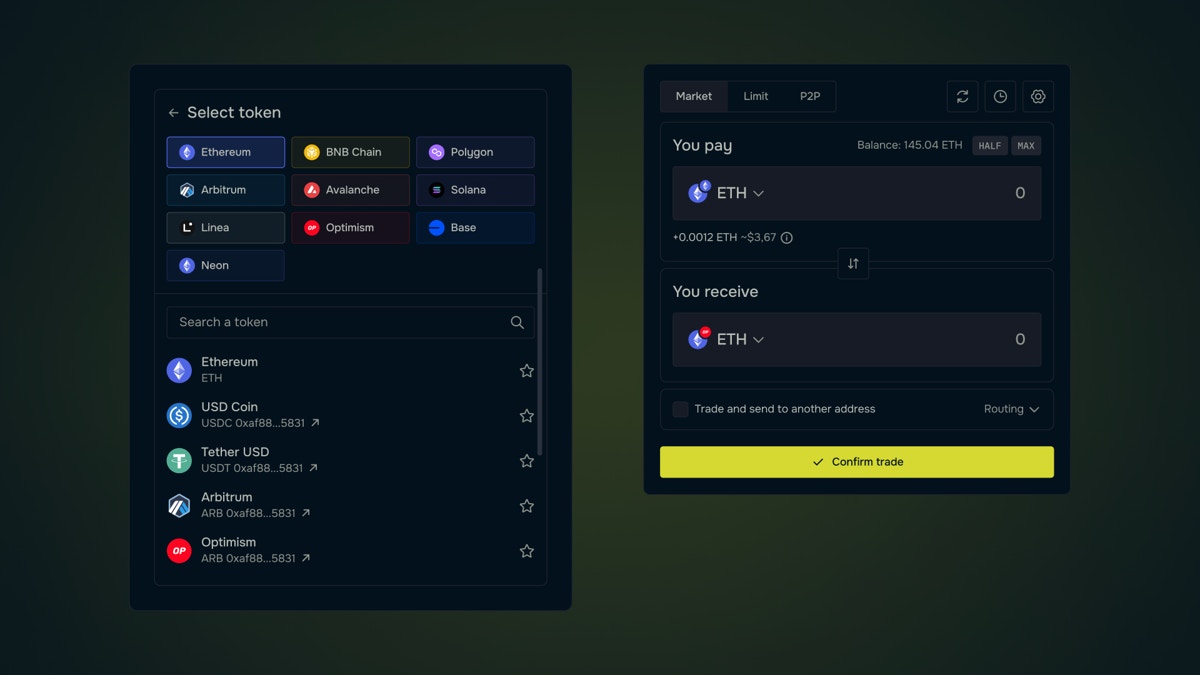
With just a few lines of code, all projects and developers can embed a cross-chain exchange between arbitrary assets within your app (mobile app,
website, dApp, etc.) based on the deBridge protocol. You can make the deBridge widget part of your app and you're fully free to customize colors,
fonts, chains, and tokens according to your design and preferences.
 # Requirements
The widget is based on web technology, that's why your app must support technology such as JavaScript, HTML, CSS or use webView to add the widget.
You can use any type of framework for the web app. The launch of the widget is going on through iframe embedded on the page. The API integration is
based on JavaScript.
# Widget embedding
The following steps are needed to add the widget:
* Connect js script to your app
```html theme={null}
```
* Add an html element with a unique id
* Generate js object with the description of the widget settings. You can use the [builder](https://app.debridge.com/widget) of deSwap Widget for
auto-generation js object.
* Initialize `deBridge.widget(initObject)`, where `initObject` contains the settings.
Initializing must be executed after connection from step 1.
# Widget object settings description
| **Parameter** | **Type** | **Description** |
| ---------------- | -------- | ------------------------------------------------------------------------------------------ |
| `element` | `string` | **(mandatory)** – Unique ID of the HTML element on the page |
| `v` | `string` | Widget version (possible value: `'1'`) |
| `mode` | `string` | Type of project (possible value: `'deswap'`) |
| `title` | `string` | Widget header |
| `width` | `number` | Width of the widget |
| `height` | `number` | Height of the widget |
| `inputChain` | `number` | ID of the input chain (possible values: `1`, `56`, `137`, `42161`, `43114`) |
| `outputChain` | `number` | ID of the output chain (same values as above) |
| `inputCurrency` | `string` | Address of the input token |
| `outputCurrency` | `string` | Address of the output token |
| `address` | `string` | Address of the receiver |
| `amount` | `string` | Amount to exchange |
| `lang` | `string` | Default language (possible values: `'en'`, `'fr'`, `'jp'`, `'ko'`, `'ru'`, `'vi'`, `'zh'`) |
| `styles` | `string` | Base64-encoded styles object |
| `theme` | `string` | Theme mode (possible values: `'dark'`, `'light'`) |
| `r` | `string` | Integrator referral code |
```json theme={null}
{
"element": "debridgeWidget",
"v": "1",
"mode": "deswap",
"title": "deSwap",
"width": "600",
"height": "800",
"inputChain": "56",
"outputChain": "1",
"inputCurrency": "0x8ac76a51cc950d9822d68b83fe1ad97b32cd580d",
"outputCurrency": "0xdac17f958d2ee523a2206206994597c13d831ec7",
"address": "0x64023dEcf09f20bA403305F5A2946b5b33d1933B",
"amount": "10",
"lang": "en",
"mode": "deswap",
"styles": "eyJmb250RmFtaWx5IjoiQWJlbCJ9",
"theme": "dark",
"r": "3981"
}
```
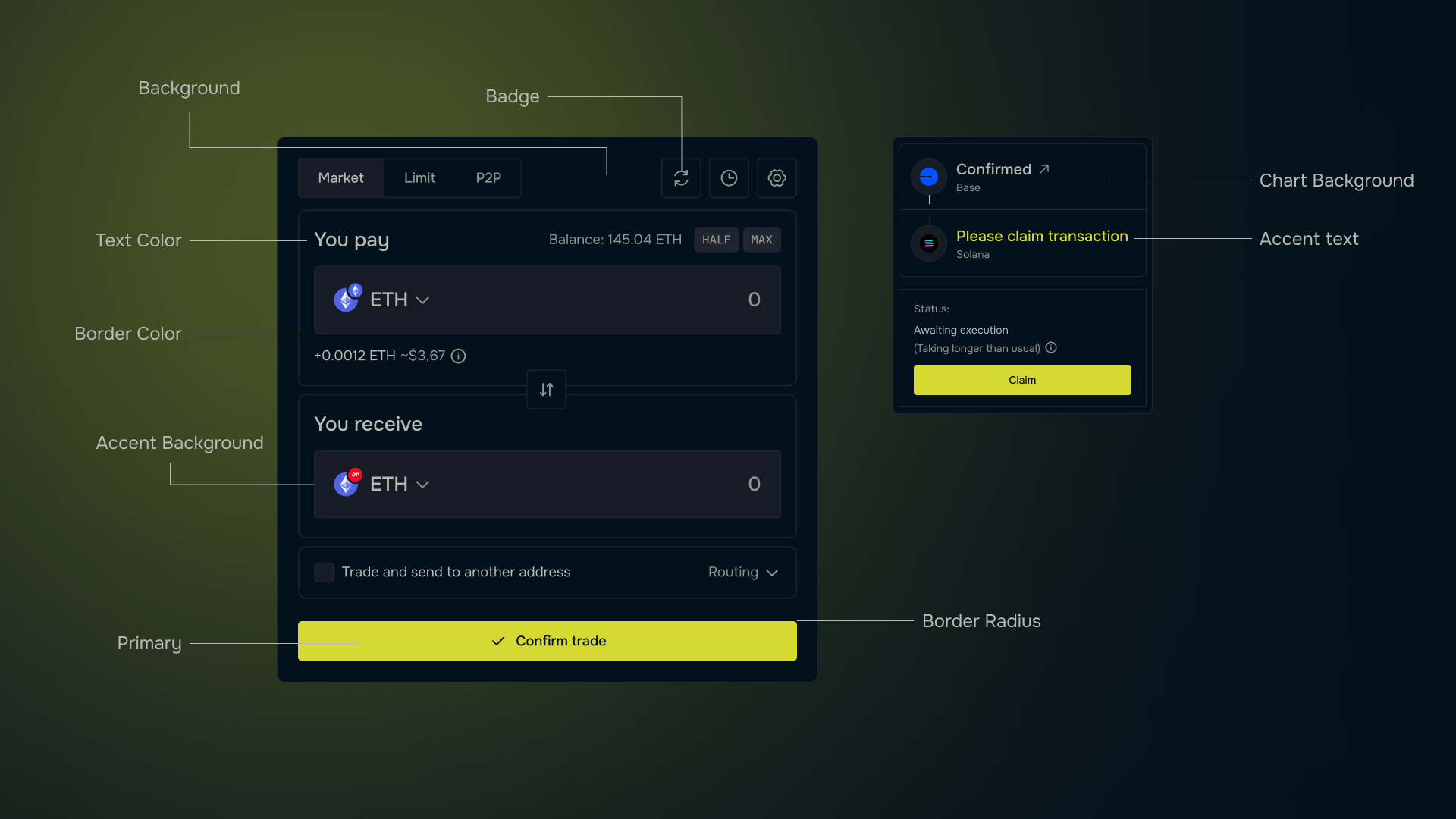
## Styles
The styles field contains the fields:
```typescript theme={null}
{
appBackground: string,
appAccentBg: string,
chartBg:string,
primary: string,
secondary: string,
badge: string,
borderColor: string,
borderRadius: number,
fontColor:string,
fontColorAccent:string,
fontFamily: string
}
```
# Requirements
The widget is based on web technology, that's why your app must support technology such as JavaScript, HTML, CSS or use webView to add the widget.
You can use any type of framework for the web app. The launch of the widget is going on through iframe embedded on the page. The API integration is
based on JavaScript.
# Widget embedding
The following steps are needed to add the widget:
* Connect js script to your app
```html theme={null}
```
* Add an html element with a unique id
* Generate js object with the description of the widget settings. You can use the [builder](https://app.debridge.com/widget) of deSwap Widget for
auto-generation js object.
* Initialize `deBridge.widget(initObject)`, where `initObject` contains the settings.
Initializing must be executed after connection from step 1.
# Widget object settings description
| **Parameter** | **Type** | **Description** |
| ---------------- | -------- | ------------------------------------------------------------------------------------------ |
| `element` | `string` | **(mandatory)** – Unique ID of the HTML element on the page |
| `v` | `string` | Widget version (possible value: `'1'`) |
| `mode` | `string` | Type of project (possible value: `'deswap'`) |
| `title` | `string` | Widget header |
| `width` | `number` | Width of the widget |
| `height` | `number` | Height of the widget |
| `inputChain` | `number` | ID of the input chain (possible values: `1`, `56`, `137`, `42161`, `43114`) |
| `outputChain` | `number` | ID of the output chain (same values as above) |
| `inputCurrency` | `string` | Address of the input token |
| `outputCurrency` | `string` | Address of the output token |
| `address` | `string` | Address of the receiver |
| `amount` | `string` | Amount to exchange |
| `lang` | `string` | Default language (possible values: `'en'`, `'fr'`, `'jp'`, `'ko'`, `'ru'`, `'vi'`, `'zh'`) |
| `styles` | `string` | Base64-encoded styles object |
| `theme` | `string` | Theme mode (possible values: `'dark'`, `'light'`) |
| `r` | `string` | Integrator referral code |
```json theme={null}
{
"element": "debridgeWidget",
"v": "1",
"mode": "deswap",
"title": "deSwap",
"width": "600",
"height": "800",
"inputChain": "56",
"outputChain": "1",
"inputCurrency": "0x8ac76a51cc950d9822d68b83fe1ad97b32cd580d",
"outputCurrency": "0xdac17f958d2ee523a2206206994597c13d831ec7",
"address": "0x64023dEcf09f20bA403305F5A2946b5b33d1933B",
"amount": "10",
"lang": "en",
"mode": "deswap",
"styles": "eyJmb250RmFtaWx5IjoiQWJlbCJ9",
"theme": "dark",
"r": "3981"
}
```
## Styles
The styles field contains the fields:
```typescript theme={null}
{
appBackground: string,
appAccentBg: string,
chartBg:string,
primary: string,
secondary: string,
badge: string,
borderColor: string,
borderRadius: number,
fontColor:string,
fontColorAccent:string,
fontFamily: string
}
```
 ```html theme={null}
Widget Example
```
# deBridge Widget events and methods
## Widget Initialization
The widget is initialized asynchronously using:
```typescript theme={null}
const widget = await deBridge.widget(params);
```
## Events
The widget object supports several event listeners that respond to specific actions. Each event can be registered using:
```typescript theme={null}
widget.on('eventName', (event, params) => {
// Handle event logic here
});
```
### Available Events
### `needConnect`
* Triggered when the widget requires a connection.
* Example handler:
```ts theme={null}
widget.on('needConnect', (widget) => {
console.log('needConnect event', widget);
});
```
### `order`
* Triggered when an order is created.
* Parameters:
* `params.status`: Order status.
* Example handler:
```ts theme={null}
widget.on('order', (widget, params) => {
console.log('order params', params);
});
```
### `singleChainSwap`
* Triggered when a single-chain swap occurs.
* Example handler:
```ts theme={null}
widget.on('singleChainSwap', (widget, params) => {
console.log('singleChainSwap params', params);
});
```
### `bridge`
* Triggered when a deport transaction occurs.
* Parameters:
* `params.status`: Bridge status.
* Example handler:
```ts theme={null}
widget.on('bridge', (widget, params) => {
console.log('deport event', widget, params);
});
```
### `callData`
* Triggered when call data for an order is required.
* Example handler:
```ts theme={null}
widget.on('callData', (widget, params) => {
if (
params.createOrderParams.takeChainId == 137 &&
params.createOrderParams.takeTokenAddress == "0x2791..."
) {
return { to: "0x...", data: "0x..." };
}
return null;
});
```
### `inputChainChanged`
* Triggered when the input chain is changed.
* Example handler:
```ts theme={null}
widget.on('inputChainChanged', (widget, params) => {
console.log('inputChainChanged event', widget, params);
});
```
### `outputChainChanged`
* Triggered when the output chain is changed.
* Example handler:
```ts theme={null}
widget.on('outputChainChanged', (widget, params) => {
console.log('outputChainChanged event', widget, params);
});
```
### `inputTokenChanged`
* Triggered when the input token is changed.
* Example handler:
```ts theme={null}
widget.on('inputTokenChanged', (widget, params) => {
console.log('inputTokenChanged event', widget, params);
});
```
### `outputTokenChanged`
* Triggered when the output token is changed.
* Example handler:
```ts theme={null}
widget.on('outputTokenChanged', (widget, params) => {
console.log('outputTokenChanged event', widget, params);
});
```
## Methods
The widget object provides several methods to programmatically interact with it.
### `disconnect()`
Disconnects the connected wallet in the widget.
* Example usage:
```ts theme={null}
widget.disconnect();
```
### `changeInputChain(chainId)`
Changes the input chain to the specified `chainId`.
* Example usage:
```ts theme={null}
widget.changeInputChain(1);
```
### `changeOutputChain(chainId)`
Changes the output chain to the specified `chainId`.
* Example usage:
```ts theme={null}
widget.changeOutputChain(10);
```
### `changeInputToken(tokenAddress)`
Changes the input token using the given token address.
* Example usage:
```ts theme={null}
widget.changeInputToken('0x...');
```
### `changeOutputToken(tokenAddress)`
Changes the output token using the given token address.
* Example usage:
```ts theme={null}
widget.changeOutputToken('0x...');
```
### `setExternalEVMWallet(walletConfig)`
Connects an external EVM-compatible wallet.
* Example usage:
```ts theme={null}
widget.setExternalEVMWallet({
provider: window.phantom?.ethereum,
name: "Metamask",
imageSrc: 'https://app.debridge.com/assets/images/dln-details/wallet/metamask.svg'
});
```
### `setExternalSolanaWallet(walletConfig)`
Connects an external Solana-compatible wallet.
* Example usage:
```ts theme={null}
widget.setExternalSolanaWallet({
provider: window.solana,
name: "Phantom",
imageSrc: 'https://app.debridge.com/assets/images/dln-details/wallet/phenom.svg'
});
```
### `setReceiverAddress(address)`
Sets the receiver's wallet address.
* Example usage:
```ts theme={null}
widget.setReceiverAddress('0x...');
```
### `setAffiliateFee(feeConfig)`
Sets the affiliate fee for Solana and EVM networks.
* Example usage:
```ts theme={null}
widget.setAffiliateFee({
solana: {
affiliateFeePercent: '0.5',
affiliateFeeRecipient: 'B5...',
},
evm: {
affiliateFeePercent: '1',
affiliateFeeRecipient: '0x...',
}
});
```
# deBridge Widget builder
The builder is available at [https://app.debridge.com/widget](https://app.debridge.com/widget) and contains:
* Widget settings fields
* Widget preview
* Field with source code for embedding in the application
# Work Algorithm
* Fill in the fields of widget settings to see your future widget. All field changes are updated in real time.
* Once UI and other settings suit your requirements, you can just copy the source code to your project to embed the widget according to the "Widget
embedding" section.
```html theme={null}
Widget Example
```
# deBridge Widget events and methods
## Widget Initialization
The widget is initialized asynchronously using:
```typescript theme={null}
const widget = await deBridge.widget(params);
```
## Events
The widget object supports several event listeners that respond to specific actions. Each event can be registered using:
```typescript theme={null}
widget.on('eventName', (event, params) => {
// Handle event logic here
});
```
### Available Events
### `needConnect`
* Triggered when the widget requires a connection.
* Example handler:
```ts theme={null}
widget.on('needConnect', (widget) => {
console.log('needConnect event', widget);
});
```
### `order`
* Triggered when an order is created.
* Parameters:
* `params.status`: Order status.
* Example handler:
```ts theme={null}
widget.on('order', (widget, params) => {
console.log('order params', params);
});
```
### `singleChainSwap`
* Triggered when a single-chain swap occurs.
* Example handler:
```ts theme={null}
widget.on('singleChainSwap', (widget, params) => {
console.log('singleChainSwap params', params);
});
```
### `bridge`
* Triggered when a deport transaction occurs.
* Parameters:
* `params.status`: Bridge status.
* Example handler:
```ts theme={null}
widget.on('bridge', (widget, params) => {
console.log('deport event', widget, params);
});
```
### `callData`
* Triggered when call data for an order is required.
* Example handler:
```ts theme={null}
widget.on('callData', (widget, params) => {
if (
params.createOrderParams.takeChainId == 137 &&
params.createOrderParams.takeTokenAddress == "0x2791..."
) {
return { to: "0x...", data: "0x..." };
}
return null;
});
```
### `inputChainChanged`
* Triggered when the input chain is changed.
* Example handler:
```ts theme={null}
widget.on('inputChainChanged', (widget, params) => {
console.log('inputChainChanged event', widget, params);
});
```
### `outputChainChanged`
* Triggered when the output chain is changed.
* Example handler:
```ts theme={null}
widget.on('outputChainChanged', (widget, params) => {
console.log('outputChainChanged event', widget, params);
});
```
### `inputTokenChanged`
* Triggered when the input token is changed.
* Example handler:
```ts theme={null}
widget.on('inputTokenChanged', (widget, params) => {
console.log('inputTokenChanged event', widget, params);
});
```
### `outputTokenChanged`
* Triggered when the output token is changed.
* Example handler:
```ts theme={null}
widget.on('outputTokenChanged', (widget, params) => {
console.log('outputTokenChanged event', widget, params);
});
```
## Methods
The widget object provides several methods to programmatically interact with it.
### `disconnect()`
Disconnects the connected wallet in the widget.
* Example usage:
```ts theme={null}
widget.disconnect();
```
### `changeInputChain(chainId)`
Changes the input chain to the specified `chainId`.
* Example usage:
```ts theme={null}
widget.changeInputChain(1);
```
### `changeOutputChain(chainId)`
Changes the output chain to the specified `chainId`.
* Example usage:
```ts theme={null}
widget.changeOutputChain(10);
```
### `changeInputToken(tokenAddress)`
Changes the input token using the given token address.
* Example usage:
```ts theme={null}
widget.changeInputToken('0x...');
```
### `changeOutputToken(tokenAddress)`
Changes the output token using the given token address.
* Example usage:
```ts theme={null}
widget.changeOutputToken('0x...');
```
### `setExternalEVMWallet(walletConfig)`
Connects an external EVM-compatible wallet.
* Example usage:
```ts theme={null}
widget.setExternalEVMWallet({
provider: window.phantom?.ethereum,
name: "Metamask",
imageSrc: 'https://app.debridge.com/assets/images/dln-details/wallet/metamask.svg'
});
```
### `setExternalSolanaWallet(walletConfig)`
Connects an external Solana-compatible wallet.
* Example usage:
```ts theme={null}
widget.setExternalSolanaWallet({
provider: window.solana,
name: "Phantom",
imageSrc: 'https://app.debridge.com/assets/images/dln-details/wallet/phenom.svg'
});
```
### `setReceiverAddress(address)`
Sets the receiver's wallet address.
* Example usage:
```ts theme={null}
widget.setReceiverAddress('0x...');
```
### `setAffiliateFee(feeConfig)`
Sets the affiliate fee for Solana and EVM networks.
* Example usage:
```ts theme={null}
widget.setAffiliateFee({
solana: {
affiliateFeePercent: '0.5',
affiliateFeeRecipient: 'B5...',
},
evm: {
affiliateFeePercent: '1',
affiliateFeeRecipient: '0x...',
}
});
```
# deBridge Widget builder
The builder is available at [https://app.debridge.com/widget](https://app.debridge.com/widget) and contains:
* Widget settings fields
* Widget preview
* Field with source code for embedding in the application
# Work Algorithm
* Fill in the fields of widget settings to see your future widget. All field changes are updated in real time.
* Once UI and other settings suit your requirements, you can just copy the source code to your project to embed the widget according to the "Widget
embedding" section.